# BootStrap
validate做表单校验
Bootstrap :页面布局和美化
# 一、validate插件
# 1.1、validate插件概述
为了更好地实现人机交互,使用jQuery封装库中的validate插件,在用户填写表单时,可以快速地对用户填写的数据进行验证,并做出反馈。
Validation拥有如下特点:
- 内置验证规则: 拥有必填、数字、Email、URL和信用卡号码等19类内置验证规则;
- 自定义验证规则: 可以很方便地自定义验证规则;
- 简单强大的验证信息提示: 默认了验证信息提示,并提供自定义覆盖默认的提示信息的功能;
- 实时验证: 可能通过keyup或blur事件触发验证,而不仅仅在表单提交的时候验证。
# 1.2、validate插件入门
使用步骤:
- 导入jQuery文件;
- 导入validate.js;
- 导入messages_zh.js,用于显示中文提示;
- 使用
$("选择器").validate()进行校验;- 在validate中编写校验规则
<!DOCTYPE html>
<html lang="en">
<head>
    <meta charset="UTF-8">
    <title>登录校验</title>
    <style>
        label[class='error'] {
            color: #ff0000;
        }
    </style>
    <script src="js/jquery-3.4.1.min.js"></script>
    <script src="js/jquery.validate.min.js"></script>
    <script src="js/messages_zh.min.js"></script>
    <script>
        $(function () {
            $('#fm').validate({
                rules: {
                    username: {
                        required: true,
                    },
                    password: {
                        required: true
                    }
                },
                messages: {
                    username: '请输入用户名',
                    password: '请输入密码'
                }
            })
        })
    </script>
</head>
<body>
    <form id="fm" action="https://www.baidu.com">
        <p>
            <label>账号</label>
            <input type="text" name="username"/>
        </p>
        <p>
            <label>密码</label>
            <input type="password" name="password"/>
        </p>
        <p>
            <button type="submit">登录</button>
        </p>
    </form>
</body>
</html>
1
2
3
4
5
6
7
8
9
10
11
12
13
14
15
16
17
18
19
20
21
22
23
24
25
26
27
28
29
30
31
32
33
34
35
36
37
38
39
40
41
42
43
44
45
46
47
48
49
50
51
2
3
4
5
6
7
8
9
10
11
12
13
14
15
16
17
18
19
20
21
22
23
24
25
26
27
28
29
30
31
32
33
34
35
36
37
38
39
40
41
42
43
44
45
46
47
48
49
50
51
1使用注意点:核心方法 表单的.validate() 2传参是对象{},rules:{} ,rules中的规则定义属性是对象,名字要和标签的name属性一致,messages:{},属性是字符串
# 1.3、validate插件校验规则
| 属性 | 描述 |
|---|---|
| required:true | 必输字段 |
remote:"test.action" | 使用ajax方法调用check.action验证输入值 |
email:true | 必须输入正确格式的电子邮件 |
url:true | 必须输入正确格式的网址 |
| date:true | 必须输入正确格式的日期 日期校验ie6出错,慎用 |
dateISO:true | 必须输入正确格式的日期(ISO),例如:2009-06-23,1998/01/22 只验证格式,不验证有效性 |
number:true | 必须输入合法的数字(负数,小数) |
digits:true | 必须输入整数 |
equalTo:"#field" | 输入值必须和#field相同 |
| maxlength:5 | 输入长度最多是5的字符串(汉字算一个字符) |
minlength:10 | 输入长度最小是10的字符串(汉字算一个字符) |
rangelength:[5,10] | 输入长度必须介于 5 和 10 之间的字符串(汉字算一个字符) |
range:[5,10] | 输入值必须介于 5 和 10 之间 |
max:5 | 输入值不能大于5 |
min:10 | 输入值不能小于10 |
<!DOCTYPE html>
<html lang="en">
<head>
    <meta charset="UTF-8">
    <title>登录校验</title>
    <style>
        label[class='error'] {
            color: #ff0000;
        }
    </style>
    <script src="js/jquery-3.4.1.min.js"></script>
    <script src="js/jquery.validate.min.js"></script>
    <script src="js/messages_zh.min.js"></script>
    <script>
        $(function () {
            $('#fm').validate({
                rules: {
                    username: {
                        required: true,
                        rangelength:[6,10]
                    },
                    password: {
                        required: true,
                        rangelength:[6,10]
                    },
                    password1: {
                        required: true,
                        equalTo: "input[name='password']"
                    }
                },
                messages: {
                    username: '用户名长度必须是6~10位的字符',
                    password: '密码长度必须是6~10位的字符',
                    password1: '两次输入的密码必须相同'
                }
            })
        })
    </script>
</head>
<body>
    <form id="fm" action="https://www.baidu.com">
        <p>
            <label>账号</label>
            <input type="text" name="username"/>
        </p>
        <p>
            <label>密码</label>
            <input type="password" name="password"/>
        </p>
        <p>
            <label>重复密码</label>
            <input type="password" name="password1"/>
        </p>
        <p>
            <button type="submit">注册</button>
        </p>
    </form>
</body>
</html>
1
2
3
4
5
6
7
8
9
10
11
12
13
14
15
16
17
18
19
20
21
22
23
24
25
26
27
28
29
30
31
32
33
34
35
36
37
38
39
40
41
42
43
44
45
46
47
48
49
50
51
52
53
54
55
56
57
58
59
2
3
4
5
6
7
8
9
10
11
12
13
14
15
16
17
18
19
20
21
22
23
24
25
26
27
28
29
30
31
32
33
34
35
36
37
38
39
40
41
42
43
44
45
46
47
48
49
50
51
52
53
54
55
56
57
58
59
# 二、Bootstrap
# 2.1、Bootstrap概述
- Bootstrap是一个用于快速开发Web应用程序和网站的前端框架。Bootstrap是基于HTML、CSS、JavaScript的。Bootstrap是由Twitter的Mark Otto和Jacob Thornton开发的。Bootstrap是2011年八月在GitHub上发布的开源产品。
- Boostrap特点:
- 移动设备优先,自Bootstrap 3起,框架包含了贯穿于整个库的移动设备优先的样式。
- 浏览器支持,所有的主流浏览器都支持Bootstrap。
- 容易上手:只要您具备HTML和CSS的基础知识,您就可以开始学习Bootstrap。
- 响应式设计:Bootstrap的响应式 CSS 能够自适应于台式机、平板电脑和手机。
# 2.2、入门案例
<!DOCTYPE html>
<html lang="en">
<head>
    <meta charset="UTF-8">
    <title>bootstrap起步</title>
    <link rel="stylesheet" href="css/bootstrap.css" />
    <!-- jQuery必须在bootstrap js文件的前面 -->
    <script src="js/jquery-3.4.1.min.js"></script>
    <script src="js/bootstrap.js"></script>
</head>
<body>
    <!--
        html
        css
        做网页
        一、是什么
            “框架” -- 软件的半成品
            Bootstrap -- 前端的UI框架

            中文官网:https://v3.bootcss.com/
        二、环境搭建
            在网页中引入各种资源就可以使用 --- 需要依赖jQuery
                |---1.bootstrap的css
                |---2.jQuery(2必须在3的前面)
                |---3.bootstrap的js
    -->
    <h1>标题1 hello BootStrap</h1>
</body>
</html>
1
2
3
4
5
6
7
8
9
10
11
12
13
14
15
16
17
18
19
20
21
22
23
24
25
26
27
28
29
2
3
4
5
6
7
8
9
10
11
12
13
14
15
16
17
18
19
20
21
22
23
24
25
26
27
28
29
使用步骤: 1.引人bootstrap的css 2.引入jQuery 3.bootstrap的js
# 2.3、栅格系统 常用
1 一个大div包裹 class=container 或 container-fluid
2 一行div class= row
3 行内布局 div class= col-md-1
<!DOCTYPE html>
<html lang="en">
<head>
    <meta charset="UTF-8">
    <title>栅格系统</title>
    <link rel="stylesheet" href="css/bootstrap.css" />
    <!-- jQuery必须在bootstrap js文件的前面 -->
    <script src="js/jquery-3.4.1.min.js"></script>
    <script src="js/bootstrap.js"></script>
    <style>
        div[class^='col-md-'] {
            border: 1px solid black;
        }


    </style>
</head>
<body>
    <!--
        1.布局 --- 在什么位置放特定的内容 --- 如何实现布局? div+css 栅格系统
        2.在bootstrap中布局需要container容器 -- 其他的元素都要放在这个容器中
            <div class="container"></div>   有宽度,居中,两侧留白
            <div class="container-fluid"></div>   占据整个页面
    -->
    <div class="container">
        <div class="row text-center">
             <div class="col-md-1">1</div>
             <div class="col-md-1">1</div>
             <div class="col-md-1">1</div>
             <div class="col-md-1">1</div>
             <div class="col-md-1">1</div>
             <div class="col-md-1">1</div>
             <div class="col-md-6 text-center">6</div>
        </div>
    </div>
    <!--<div class="container-fluid" style="background-color: red;">hello container-fluid</div>-->
</body>
</html>
1
2
3
4
5
6
7
8
9
10
11
12
13
14
15
16
17
18
19
20
21
22
23
24
25
26
27
28
29
30
31
32
33
34
35
36
37
38
2
3
4
5
6
7
8
9
10
11
12
13
14
15
16
17
18
19
20
21
22
23
24
25
26
27
28
29
30
31
32
33
34
35
36
37
38
栅格系统案例
<!DOCTYPE html>
<html lang="en">
<head>
    <meta charset="UTF-8">
    <title>栅格系统</title>
    <link rel="stylesheet" href="css/bootstrap.css" />
    <!-- jQuery必须在bootstrap js文件的前面 -->
    <script src="js/jquery-3.4.1.min.js"></script>
    <script src="js/bootstrap.js"></script>
    <style>
        div[class^='col-md-'] {
            border: 1px solid black;
        }
    </style>
</head>
<body>
    <!--
        1.布局 --- 在什么位置放特定的内容 --- 如何实现布局? div+css 栅格系统
        2.在bootstrap中布局需要container容器 -- 其他的元素都要放在这个容器中
            <div class="container"></div>   有宽度,居中,两侧留白
            <div class="container-fluid"></div>   占据整个页面
    -->
    <div class="container-fluid">
        <div class="row">
             <div class="col-md-12" style="height: 100px; background-color: yellow">111</div>
        </div>
        <div class="row">
            <div class="col-md-3" style="height: 500px;">222</div>
            <div class="col-md-9" style="height: 500px;">333</div>
        </div>
        <div class="row">
            <div class="col-md-12" style="height: 100px; background-color: greenyellow;">444</div>
        </div>
    </div>
    <!--<div class="container-fluid" style="background-color: red;">hello container-fluid</div>-->
</body>
</html>
1
2
3
4
5
6
7
8
9
10
11
12
13
14
15
16
17
18
19
20
21
22
23
24
25
26
27
28
29
30
31
32
33
34
35
36
37
2
3
4
5
6
7
8
9
10
11
12
13
14
15
16
17
18
19
20
21
22
23
24
25
26
27
28
29
30
31
32
33
34
35
36
37
# 2.4、排版
<!DOCTYPE html>
<html lang="en">
<head>
    <meta charset="UTF-8">
    <title>排版</title>
    <link rel="stylesheet" href="css/bootstrap.css" />
    <!-- jQuery必须在bootstrap js文件的前面 -->
    <script src="js/jquery-3.4.1.min.js"></script>
    <script src="js/bootstrap.js"></script>
</head>
<body>
    <!-- 对齐 -->
    <p class="text-left">hello html</p>
    <p class="text-center">hello css</p>
    <p class="text-right">hello js</p>
    <!-- 列表 -->
    <ul class="list-inline">
        <li><a href="">百度</a></li>
        <li><a href="">新浪</a></li>
        <li><a href="">搜狐</a></li>
    </ul>
</body>
</html>
1
2
3
4
5
6
7
8
9
10
11
12
13
14
15
16
17
18
19
20
21
22
23
2
3
4
5
6
7
8
9
10
11
12
13
14
15
16
17
18
19
20
21
22
23
# 2.5、表格 常用
<!DOCTYPE html>
<html lang="en">
<head>
    <meta charset="UTF-8">
    <title>表格</title>
    <link rel="stylesheet" href="css/bootstrap.css" />
    <!-- jQuery必须在bootstrap js文件的前面 -->
    <script src="js/jquery-3.4.1.min.js"></script>
    <script src="js/bootstrap.js"></script>
</head>
<body>
    <table class="table table-striped table-bordered table-hover table-condensed">
        <tr>
            <th>id</th>
            <th>name</th>
            <th>addr</th>
        </tr>
        <tr>
            <td>1</td>
            <td>zs</td>
            <td>qd</td>
        </tr>
        <tr>
            <td>1</td>
            <td>zs</td>
            <td>qd</td>
        </tr>
        <tr class="danger">
            <td>1</td>
            <td>zs</td>
            <td>qd</td>
        </tr>
    </table>
</body>
</html>
1
2
3
4
5
6
7
8
9
10
11
12
13
14
15
16
17
18
19
20
21
22
23
24
25
26
27
28
29
30
31
32
33
34
35
2
3
4
5
6
7
8
9
10
11
12
13
14
15
16
17
18
19
20
21
22
23
24
25
26
27
28
29
30
31
32
33
34
35
# 2.6、表单 常用
.form-group
.form-control
1 表单 class设置为form-horizontal
2一组控件用一个div包裹(用户名是一组 、密码是一组) div的class 设置为form-group
3 label 中class 可以设置col-md-的宽度,同时加上control-label ,输入框用div包裹 ,div加上col-md-宽度,
**4在input中加上 form-control **
缩进:col-md-offset-2
<!DOCTYPE html>
<html lang="en">
<head>
    <meta charset="UTF-8">
    <title>表格</title>
    <link rel="stylesheet" href="css/bootstrap.css" />
    <!-- jQuery必须在bootstrap js文件的前面 -->
    <script src="js/jquery-3.4.1.min.js"></script>
    <script src="js/bootstrap.js"></script>
</head>
<body>
    <form class="form-horizontal">
        <div class="form-group">
            <label for="inputEmail3" class="col-sm-2 control-label">Email</label>
            <div class="col-sm-10">
                <input type="email" class="form-control" id="inputEmail3" placeholder="Email" disabled />
            </div>
        </div>
        <div class="form-group">
            <label for="inputPassword3" class="col-sm-2 control-label">Password</label>
            <div class="col-sm-10">
                <input type="password" class="form-control" id="inputPassword3" placeholder="Password">
            </div>
        </div>
        <div class="form-group">
            <div class="col-sm-offset-2 col-sm-10">
                <div class="checkbox">
                    <label>
                        <input type="checkbox"> Remember me
                    </label>
                </div>
            </div>
        </div>
        <div class="form-group">
            <div class="col-sm-offset-2 col-sm-10">
                <button type="submit" class="btn btn-default">Sign in</button>
            </div>
        </div>
    </form>
</body>
</html>
1
2
3
4
5
6
7
8
9
10
11
12
13
14
15
16
17
18
19
20
21
22
23
24
25
26
27
28
29
30
31
32
33
34
35
36
37
38
39
40
41
2
3
4
5
6
7
8
9
10
11
12
13
14
15
16
17
18
19
20
21
22
23
24
25
26
27
28
29
30
31
32
33
34
35
36
37
38
39
40
41
# 2.7、按钮 常用
<!DOCTYPE html>
<html lang="en">
<head>
    <meta charset="UTF-8">
    <title>按钮</title>
    <link rel="stylesheet" href="css/bootstrap.css" />
    <!-- jQuery必须在bootstrap js文件的前面 -->
    <script src="js/jquery-3.4.1.min.js"></script>
    <script src="js/bootstrap.js"></script>
</head>
<body>
    <button type="button" class="btn btn-default">click</button>
    <button type="button" class="btn btn-danger">删除</button>
    <button type="button" class="btn btn-primary btn-xs">添加</button>
    <br/>
    <a href="https://www.baidu.com" class="btn btn-primary btn-lg">修改</a>
</body>
</html>
1
2
3
4
5
6
7
8
9
10
11
12
13
14
15
16
17
18
2
3
4
5
6
7
8
9
10
11
12
13
14
15
16
17
18
# 2.8、图像
<!DOCTYPE html>
<html lang="en">
<head>
    <meta charset="UTF-8">
    <title>图像</title>
    <link rel="stylesheet" href="css/bootstrap.css" />
    <!-- jQuery必须在bootstrap js文件的前面 -->
    <script src="js/jquery-3.4.1.min.js"></script>
    <script src="js/bootstrap.js"></script>
</head>
<body>
    <img src="img/logo.jpg" style="height: 100px; width: 100px;" class="img-circle" />
    <img src="img/logo.jpg" style="height: 100px; width: 100px;" class="img-thumbnail" />
    <img src="img/logo.jpg" style="height: 100px; width: 100px;" class="img-rounded" />
</body>
</html>
1
2
3
4
5
6
7
8
9
10
11
12
13
14
15
16
2
3
4
5
6
7
8
9
10
11
12
13
14
15
16
# 2.9、图标
span
<!DOCTYPE html>
<html lang="en">
<head>
    <meta charset="UTF-8">
    <title>图标</title>
    <link rel="stylesheet" href="css/bootstrap.css" />
    <!-- jQuery必须在bootstrap js文件的前面 -->
    <script src="js/jquery-3.4.1.min.js"></script>
    <script src="js/bootstrap.js"></script>
</head>
<body>
    <button type="button" class="btn btn-default"><span class="glyphicon glyphicon-search" aria-hidden="true"></span></button>
    <button type="button" class="btn btn-danger"><span style="margin-right: 5px;">删除</span><span class="glyphicon glyphicon-trash"></span></button>
    <button type="button" class="btn btn-primary btn-xs">添加</button>
</body>
</html>
1
2
3
4
5
6
7
8
9
10
11
12
13
14
15
16
2
3
4
5
6
7
8
9
10
11
12
13
14
15
16
# 2.10、模态框 常用
1 <button> 标签中, data-toggle="modal" data-target="#myModal"关联按钮和模态框
2 在取消按钮或关闭X中设置,data-dismiss="modal" 用于关闭模态窗口

3 class="modal-header",用于为模态窗口的头部设置样式。

4 class="modal-body",用于为模态窗口的主体设置样式。

5 class="modal-footer",用于为模态窗口的底部设置样式。
1
2
3
4
5
6
7
8
2
3
4
5
6
7
8
<!DOCTYPE html>
<html lang="en">
<head>
<meta charset="UTF-8">
<title>模态框</title>
<link rel="stylesheet" href="css/bootstrap.css" />
<!-- jQuery必须在bootstrap js文件的前面 -->
<script src="js/jquery-3.4.1.min.js"></script>
<script src="js/bootstrap.js"></script>
</head>
<body>
<!-- Button trigger modal -->
<button type="button" class="btn btn-primary btn-lg" data-toggle="modal" data-target="#myModal">
Launch demo modal
</button>
<!-- Modal -->
<div class="modal fade" id="myModal" tabindex="-1" role="dialog" aria-labelledby="myModalLabel">
<div class="modal-dialog modal-lg" role="document">
<div class="modal-content">
<div class="modal-header">
<button type="button" class="close" data-dismiss="modal" aria-label="Close"><span aria-hidden="true">×</span></button>
<h4 class="modal-title" id="myModalLabel">添加</h4>
</div>
<div class="modal-body">
<form class="form-horizontal">
<div class="form-group">
<label for="inputEmail3" class="col-sm-2 control-label">Email</label>
<div class="col-sm-10">
<input type="email" class="form-control" id="inputEmail3" placeholder="Email" disabled />
</div>
</div>
<div class="form-group">
<label for="inputPassword3" class="col-sm-2 control-label">Password</label>
<div class="col-sm-10">
<input type="password" class="form-control" id="inputPassword3" placeholder="Password">
</div>
</div>
<div class="form-group">
<div class="col-sm-offset-2 col-sm-10">
<div class="checkbox">
<label>
<input type="checkbox"> Remember me
</label>
</div>
</div>
</div>
<div class="form-group">
<div class="col-sm-offset-2 col-sm-10">
<button type="submit" class="btn btn-default">Sign in</button>
</div>
</div>
</form>
</div>
<div class="modal-footer">
<button type="button" class="btn btn-default" data-dismiss="modal">取消</button>
<button type="button" class="btn btn-primary">保存</button>
</div>
</div>
</div>
</div>
</body>
</html>
1
2
3
4
5
6
7
8
9
10
11
12
13
14
15
16
17
18
19
20
21
22
23
24
25
26
27
28
29
30
31
32
33
34
35
36
37
38
39
40
41
42
43
44
45
46
47
48
49
50
51
52
53
54
55
56
57
58
59
60
61
62
63
64
65
2
3
4
5
6
7
8
9
10
11
12
13
14
15
16
17
18
19
20
21
22
23
24
25
26
27
28
29
30
31
32
33
34
35
36
37
38
39
40
41
42
43
44
45
46
47
48
49
50
51
52
53
54
55
56
57
58
59
60
61
62
63
64
65
# 2.11、案例
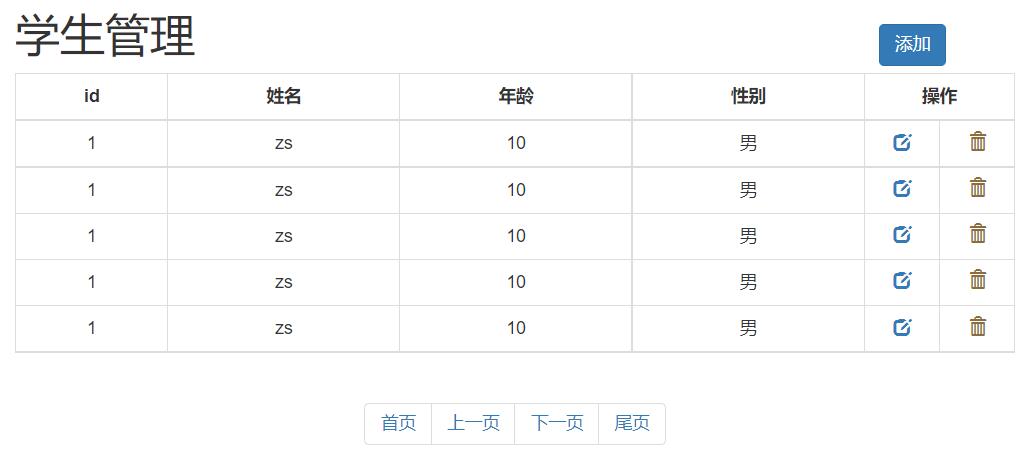
<!DOCTYPE html>
<html lang="en">
<head>
<meta charset="UTF-8">
<title>test</title>
<script src="js/jquery-3.4.1.min.js"></script>
<script src="js/bootstrap.js"></script>
<link rel="stylesheet" href="css/bootstrap.css" />
<style>
.container {
width: 800px;
}
th {
text-align: center;
}
.opt {
width: 60px;
}
</style>
</head>
<body>
<div class="container">
<div class="modal fade" id="myModal" tabindex="-1" role="dialog" aria-labelledby="myModalLabel">
<div class="modal-dialog" role="document">
<div class="modal-content">
<div class="modal-header">
<button type="button" class="close" data-dismiss="modal" aria-label="Close"><span aria-hidden="true">×</span></button>
<h4 class="modal-title" id="myModalLabel">添加学生</h4>
</div>
<div class="modal-body">
<form class="form-horizontal">
<div class="form-group">
<label for="inputEmail3" class="col-sm-2 control-label">姓名</label>
<div class="col-sm-10">
<input type="email" class="form-control" id="inputEmail3" placeholder="Email">
</div>
</div>
<div class="form-group">
<label for="inputPassword3" class="col-sm-2 control-label">年龄</label>
<div class="col-sm-10">
<input type="password" class="form-control" id="inputPassword3" placeholder="Password">
</div>
</div>
<div class="form-group">
<label for="inputPassword3" class="col-sm-2 control-label">性别</label>
<div class="col-sm-10">
<label>
<input type="radio" name="gender" value="male" /> 男
<input type="radio" name="gender" value="female" /> 女
</label>
</div>
</div>
</form>
</div>
<div class="modal-footer">
<button type="button" class="btn btn-default" data-dismiss="modal">Close</button>
<button type="button" class="btn btn-primary">Save changes</button>
</div>
</div>
</div>
</div>
<div class="row">
<h1 class="pull-left">学生管理</h1>
<button class="btn btn-primary pull-right" style="margin-top: 30px;" data-toggle="modal" data-target="#myModal">添加学生</button>
</div>
<div class="row">
<table class="table table-bordered table-hover">
<tr>
<th>id</th>
<th>姓名</th>
<th>年龄</th>
<th>性别</th>
<th colspan="2">操作</th>
</tr>
<tr>
<td>1</td>
<td>zs</td>
<td>20</td>
<td>male</td>
<td class="opt text-center">
<a><span class="glyphicon glyphicon-edit" aria-hidden="true"></span></a>
</td>
<td class="opt text-center" >
<a><span class="glyphicon glyphicon-trash" aria-hidden="true"></span></a>
</td>
</tr>
<tr>
<td>2</td>
<td>ls</td>
<td>20</td>
<td>male</td>
<td class="opt text-center">
<a><span class="glyphicon glyphicon-edit" aria-hidden="true"></span></a>
</td>
<td class="opt text-center" >
<a><span class="glyphicon glyphicon-trash" aria-hidden="true"></span></a>
</td>
</tr>
<tr>
<td>3</td>
<td>ww</td>
<td>20</td>
<td>male</td>
<td class="opt text-center">
<a><span class="glyphicon glyphicon-edit" aria-hidden="true"></span></a>
</td>
<td class="opt text-center" >
<a><span class="glyphicon glyphicon-trash" aria-hidden="true"></span></a>
</td>
</tr>
<tr>
<td>4</td>
<td>zl</td>
<td>20</td>
<td>male</td>
<td class="opt text-center">
<a><span class="glyphicon glyphicon-edit" aria-hidden="true"></span></a>
</td>
<td class="opt text-center" >
<a><span class="glyphicon glyphicon-trash" aria-hidden="true"></span></a>
</td>
</tr>
<tr>
<td>5</td>
<td>tom</td>
<td>20</td>
<td>male</td>
<td class="opt text-center">
<a><span class="glyphicon glyphicon-edit" aria-hidden="true"></span></a>
</td>
<td class="opt text-center" >
<a><span class="glyphicon glyphicon-trash" aria-hidden="true"></span></a>
</td>
</tr>
</table>
</div>
<div class="row">
<nav aria-label="Page navigation" class="text-center" style="margin-top: 0px;">
<ul class="pagination">
<li>
<a href="#" aria-label="Previous">
<span aria-hidden="true">«</span>
</a>
</li>
<li><a href="#">1</a></li>
<li><a href="#">2</a></li>
<li><a href="#">3</a></li>
<li><a href="#">4</a></li>
<li><a href="#">5</a></li>
<li>
<a href="#" aria-label="Next">
<span aria-hidden="true">»</span>
</a>
</li>
</ul>
</nav>
</div>
</div>
</body>
</html>
1
2
3
4
5
6
7
8
9
10
11
12
13
14
15
16
17
18
19
20
21
22
23
24
25
26
27
28
29
30
31
32
33
34
35
36
37
38
39
40
41
42
43
44
45
46
47
48
49
50
51
52
53
54
55
56
57
58
59
60
61
62
63
64
65
66
67
68
69
70
71
72
73
74
75
76
77
78
79
80
81
82
83
84
85
86
87
88
89
90
91
92
93
94
95
96
97
98
99
100
101
102
103
104
105
106
107
108
109
110
111
112
113
114
115
116
117
118
119
120
121
122
123
124
125
126
127
128
129
130
131
132
133
134
135
136
137
138
139
140
141
142
143
144
145
146
147
148
149
150
151
152
153
154
155
156
157
158
159
160
161
162
163
2
3
4
5
6
7
8
9
10
11
12
13
14
15
16
17
18
19
20
21
22
23
24
25
26
27
28
29
30
31
32
33
34
35
36
37
38
39
40
41
42
43
44
45
46
47
48
49
50
51
52
53
54
55
56
57
58
59
60
61
62
63
64
65
66
67
68
69
70
71
72
73
74
75
76
77
78
79
80
81
82
83
84
85
86
87
88
89
90
91
92
93
94
95
96
97
98
99
100
101
102
103
104
105
106
107
108
109
110
111
112
113
114
115
116
117
118
119
120
121
122
123
124
125
126
127
128
129
130
131
132
133
134
135
136
137
138
139
140
141
142
143
144
145
146
147
148
149
150
151
152
153
154
155
156
157
158
159
160
161
162
163