# 白名单过滤
# 仓库地址
https://gitee.com/hujincheng1732/whitelist-spring-boot-starter
# Git地址
https://gitee.com/hujincheng1732/whitelist-spring-boot-starter.git
# 使用
# 1、引入依赖
暂未上传maven仓库,需要git下载源码insatll到本地仓库引入使用
 <dependency>
     <groupId>io.starter</groupId>
     <artifactId>whitelist-spring-boot-starter</artifactId>
     <version>0.0.1-SNAPSHOT</version>
 </dependency>
1
2
3
4
5
2
3
4
5
# 2、application.properties中添加需要过滤的用户,逗号间隔
io.starter.whitelist.users=zs,ls,ww
1
# 3、控制器添加注解
# 1、注解@DoWhiteList
# 2、注解参数key
与参数或与入参中的属性一致,方可获取到对应属性的值
# 3、注解参数returnJson
表示拦截之后的返回参数,传入json
# 4、使用注解示范
@DoWhiteList(key = "userId",returnJson = "{\"code\": 500, \"msg\": \"success\"}")

@GetMapping("/testWhiteList")
@ResponseBody
@DoWhiteList(key = "userId",returnJson = "{\"code\": 500, \"msg\": \"success\"}")
public User testWhiteList(@RequestParam String userId){
 return new User().setAge(10).setName(userId);
}
1
2
3
4
5
6
7
8
2
3
4
5
6
7
8
# 4、常见问题
# 1、注解无效,无法拦截用户
需要配置包扫描路径,当前starter路径在io.starter下,如果启动类不在当前包下,需要配置启动类包扫描starter包,同时需要扫描启动类下的包
@SpringBootApplication(scanBasePackages = {"io","com"})   //配置启动类包扫描
//或者这个样,没测试
//@SpringBootApplication
//@ComponentScan(basePackages = {"io.*"})
public class TestApplication {

    public static void main(String[] args) {
        SpringApplication.run(TestApplication.class, args);
    }
}
1
2
3
4
5
6
7
8
9
10
2
3
4
5
6
7
8
9
10
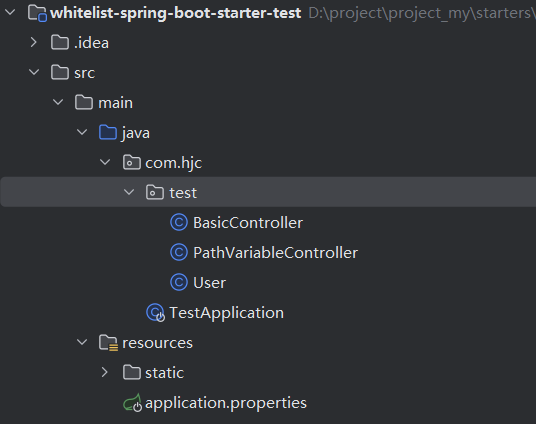
白名单starter测试项目的目录结构
← 自定义starter 动态线程池组件 →