# Seata
小结:
nacos 【name server】:注册中心,解决服务的注册与发现
nacos【config】:配置中心,微服务配置文件的中心化管理,同时配置信息的动态刷新
Ribbon:客户端负载均衡器,解决微服务集群负载均衡的问题
Openfeign:声明式HTTP客户端,解决微服务之间远程调用问题
Sentinel:微服务流量防卫兵,以流量为入口,保护微服务,防止服务雪崩
gateway:微服务网关,服务集群的入口,路由转发以及负载均衡(全局认证、流控)
sleuth:链路追踪
seata:分布式事务解决方案
2
3
4
5
6
7
8
9
面试:
1:什么是分布式事务
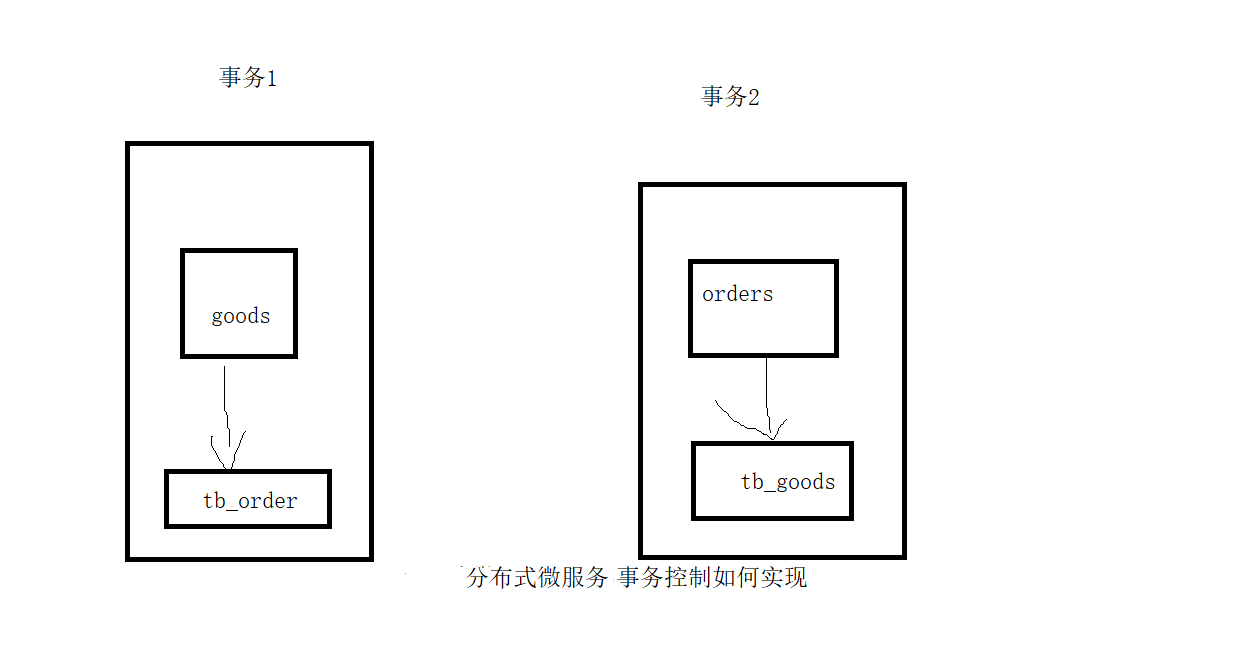
分布式系统中,跨连接的事务
2:怎么解决分布式事务? seata
3:seata分布式事务的工作流程/原理/机制
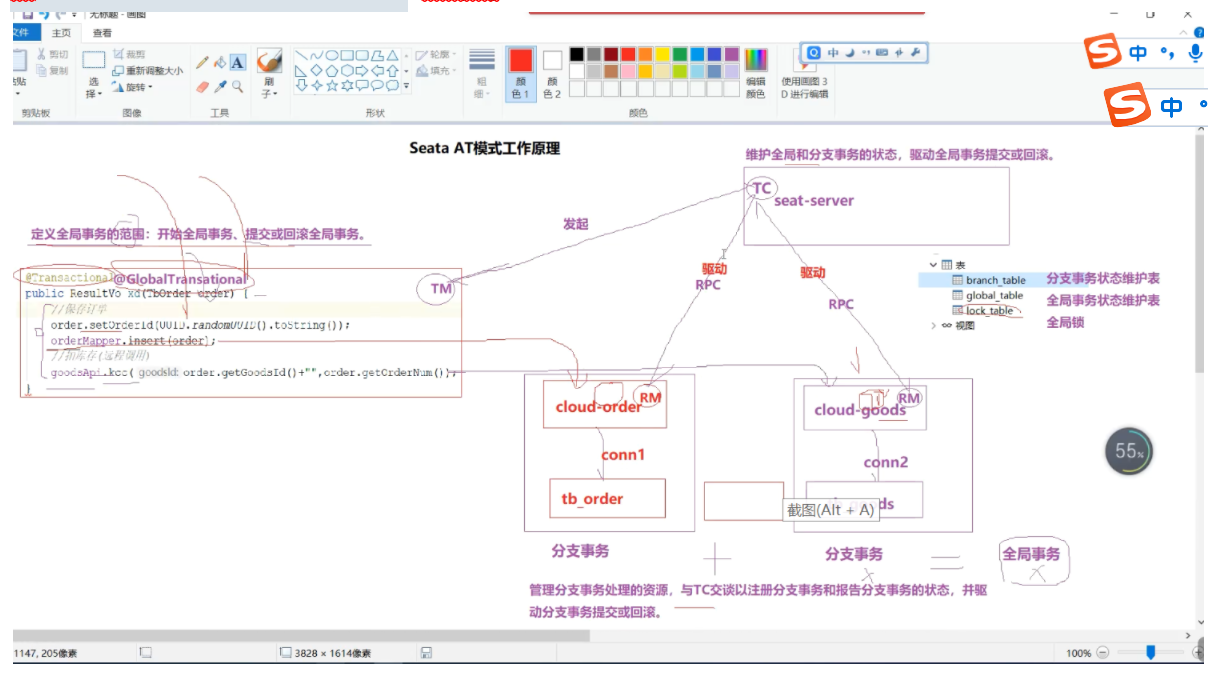
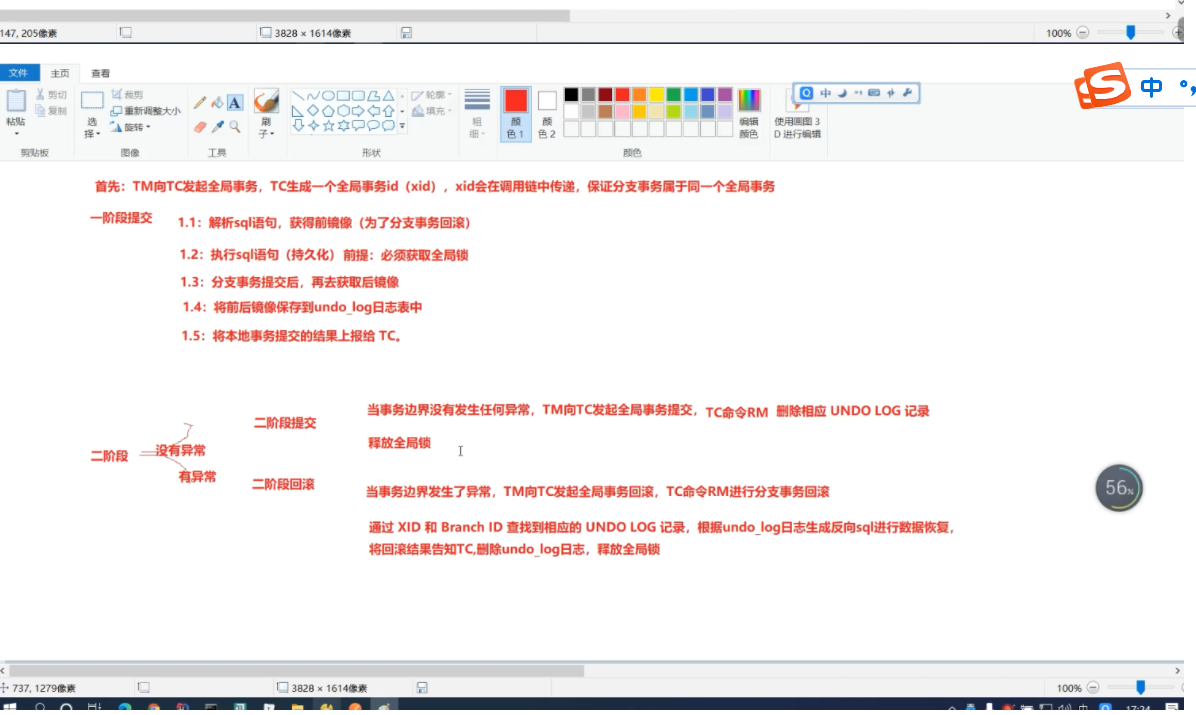
TM:事务管理器 ,标注了@GlobalTransational的方法就受TM的管理,开启全局事务,发起全局事务的提交, 或回滚
TC: Seata 服务器,事务协调器 ,接收TM的指令,向RM传达指令,生成全局事务ID RM:Seata 客户端,资源管理器 一阶段提交:解析和执行sql语句,需要获取全局锁,获取前后镜像存放到undo_log表 二阶段提交:删除undo_log表记录 ,释放全局锁
二阶段回滚:执行sql语句数据恢复,删除undo_log表记录 ,释放全局锁
4:seata全局事务并发隔离如何实现?
(1) 全局锁可以保证写隔离,拿不到全局锁,不能提交分支事务
(2)读加锁(select for update) 可以保证读隔离,避免脏读
# 一:分布式事务简介
# 1.1:本地事务
单服务进程,单数据库资源,同一个连接conn多个事务操作
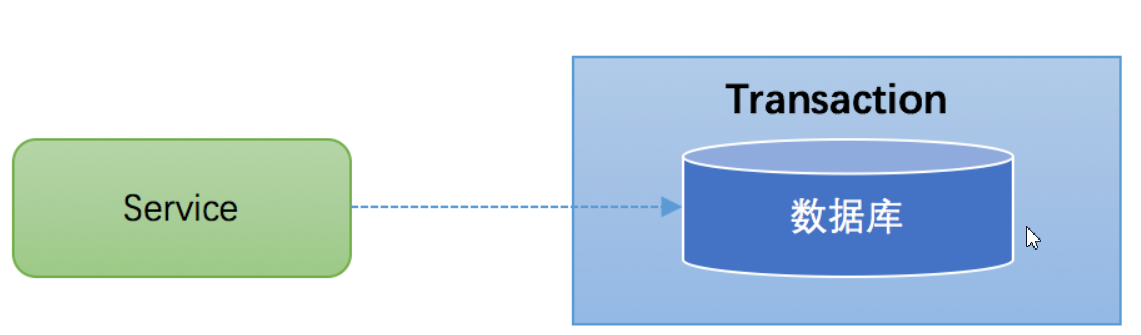
在JDBC编程中,我们通过java.sql.Connection对象来开启、关闭或者提交事务。代码如下所示:
Connection conn = ... //获取数据库连接
conn.setAutoCommit(false); //开启事务
try{
    //1:张三-100 conn1
    //2:李四+100 conn2
    //3.其他操作10/0
    conn.commit(); //提交事务
}catch (Exception e) {
    conn.rollback();//事务回滚
}finally{
    conn.close();//关闭链接
}
2
3
4
5
6
7
8
9
10
11
12
13
Spring声明式事务(基于aop实现)
   /**
     * @param fromUserName 转账人
     * @param toUserName 被转账人
     * @param changeSal 转账额度
     */
    @Transactional(rollbackFor = Exception.class)
    public void changeSal(String fromUserName,String toUserName,int changeSal) {
        bankMapper.updateSal(fromUserName, -1 * changeSal);
        bankMapper.updateSal(toUserName, changeSal);
        int i = 10/0
    }
2
3
4
5
6
7
8
9
10
11
12
# 1.2:分布式事务
# 1.3:分布式事务问题复现
模拟下单需求
1:cloud-order服务:提交订单(tb_order insert)
2:cloud-goods服务:扣减库存(tb_goods update) api
entity
package com.example.entity;

import com.baomidou.mybatisplus.annotation.*;
import java.io.Serializable;
import lombok.Data;
@Data
@TableName("tb_goods")
public class TbGoods implements Serializable {
        /**
        *
        */
            @TableId(type = IdType.ASSIGN_ID)
        private Integer goodsId;
        /**
        *
        */
        private Integer goodsStock;
        /**
        *
        */
        private Double goodsPrice;
        /**
        *
        */
        private String goodsName;
}
2
3
4
5
6
7
8
9
10
11
12
13
14
15
16
17
18
19
20
21
22
23
24
25
26
27
package com.example.entity;

import com.baomidou.mybatisplus.annotation.*;
import lombok.Data;
import java.io.Serializable;
@Data
@TableName("tb_order")
public class TbOrder implements Serializable {
    /**
     *
     */
    @TableId(type = IdType.ASSIGN_ID)
    private String orderId;
    /**
     *
     */
    private Integer orderNum;
    /**
     *
     */
    private Double orderAmount;
    /**
     *
     */
    private Integer goodsId;
}
2
3
4
5
6
7
8
9
10
11
12
13
14
15
16
17
18
19
20
21
22
23
24
25
26
<dependency>
    <groupId>org.projectlombok</groupId>
    <artifactId>lombok</artifactId>
</dependency>
<dependency>
    <groupId>com.baomidou</groupId>
    <artifactId>mybatis-plus</artifactId>
    <version>3.4.2</version>
</dependency>
2
3
4
5
6
7
8
9
10
<dependencies>
        <dependency>
            <groupId>com.baomidou</groupId>
            <artifactId>mybatis-plus-boot-starter</artifactId>
            <version>3.4.2</version>
        </dependency>

        <!--    mysql驱动    -->
        <dependency>
            <groupId>mysql</groupId>
            <artifactId>mysql-connector-java</artifactId>
            <version>5.1.49</version>
        </dependency>
        <!--   druid     -->
        <dependency>
            <groupId>com.alibaba</groupId>
            <artifactId>druid-spring-boot-starter</artifactId>
            <version>1.1.10</version>
        </dependency>


    </dependencies>
2
3
4
5
6
7
8
9
10
11
12
13
14
15
16
17
18
19
20
21
22
spring:
  datasource:
    druid:
      driver-class-name: com.mysql.jdbc.Driver
      username: root
      password: 123456
      url: jdbc:mysql://127.0.0.1:3306/cloud_demo?useUnicode=true&characterEncoding=utf8&useSSL=false
      max-active: 40 #连接池配置
#输出sql语句
mybatis-plus:
  configuration:
    log-impl: org.apache.ibatis.logging.stdout.StdOutImpl
2
3
4
5
6
7
8
9
10
11
12
模拟下单: 在qf-cloud-orders订单模块存入订单信息到tb_order,feign远程调用qf-clouds-goods商品模块更新商品库存(tb_goods update)
# 二:Seata简介
Seata(Simple Extensible Autonomous Transaction Architecture) 是 阿里巴巴开源的分布式事务中间件,以高效并且对业务 0 侵入的方式,解决微服务场景下面临的分布式事务问题。
github地址:https://github.com/seata/seata
中文官网:http://seata.io/zh-cn/
# 2.1:AT模式角色分析
Transaction Coordinator(TC): Maintain status of global and branch transactions, drive the global commit or rollback.

Transaction Manager(TM): Define the scope of global transaction: begin a global transaction, commit or rollback a global transaction.

Resource Manager(RM): Manage resources that branch transactions working on, talk to TC for registering branch transactions and reporting status of branch transactions, and drive the branch transaction commit or rollback.
2
3
4
5
- Transaction Coordinator (TC): 事务协调器,维护全局事务的运行状态,负责协调并驱动全局事务的提交或回滚
- Transaction Manager ™:事务管理器, 控制全局事务的边界 ,负责开启一个全局事务,并最终发起全局提交或全局回滚的决议
- Resource Manager (RM): 资源管理器,控制分支事务,负责分支注册、状态汇报,并接收事务协调器的指令,驱动分支(本地)事务的提交和回滚
# 2.2:AT模式工作流程
# 三:Seata应用
# 3.1:下载seata-server
下载地址:Tags · seata/seata · GitHub (opens new window)
# 3.2:配置Seata-server
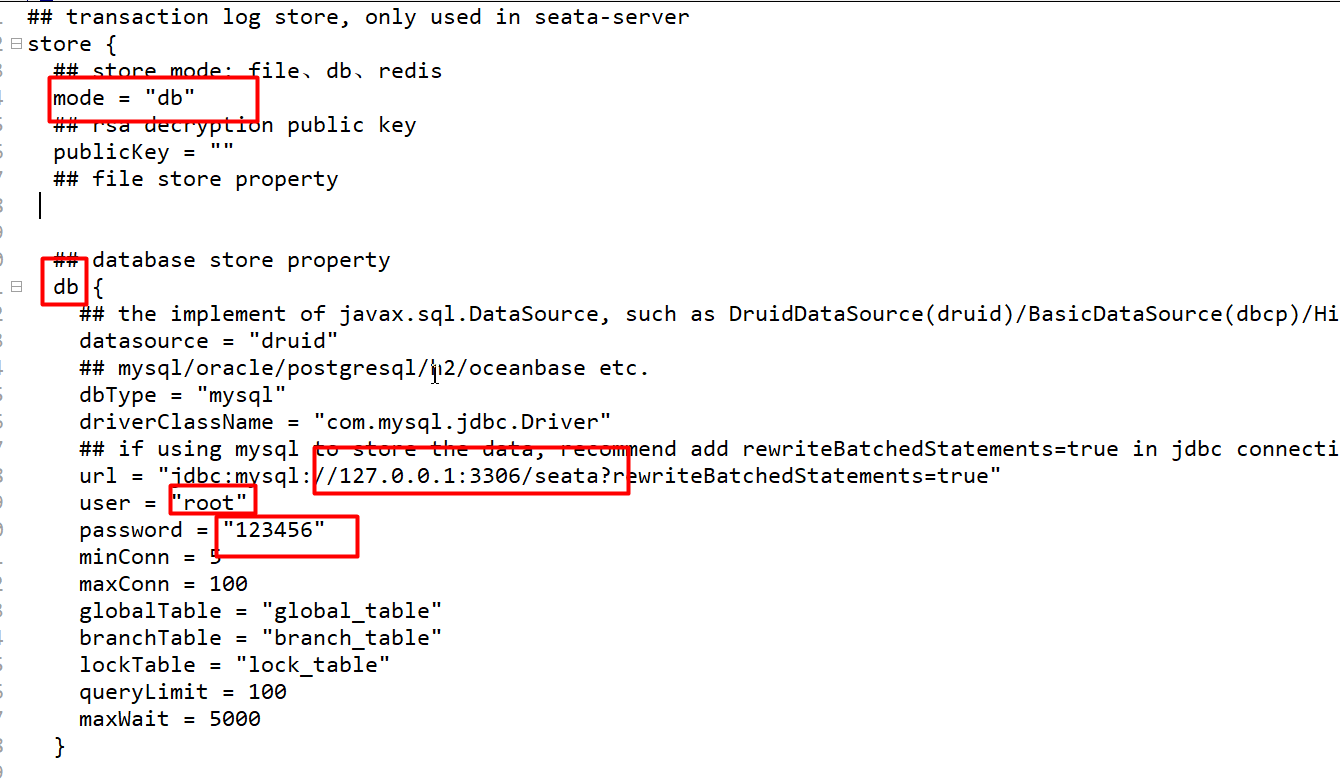
# 3.2.1:配置seata-server数据源
E:\seata-server-1.4.2\seata\seata-server-1.4.2\conf\file.conf
# 3.2.2:创建seata数据库
create database seata
# 3.2.3:创建3张表
表的脚本下载地址:https://github.com/seata/seata/tree/develop/script/server/db
-- -------------------------------- The script used when storeMode is 'db' --------------------------------
-- the table to store GlobalSession data
CREATE TABLE IF NOT EXISTS `global_table`
(
    `xid`                       VARCHAR(128) NOT NULL,
    `transaction_id`            BIGINT,
    `status`                    TINYINT      NOT NULL,
    `application_id`            VARCHAR(32),
    `transaction_service_group` VARCHAR(32),
    `transaction_name`          VARCHAR(128),
    `timeout`                   INT,
    `begin_time`                BIGINT,
    `application_data`          VARCHAR(2000),
    `gmt_create`                DATETIME,
    `gmt_modified`              DATETIME,
    PRIMARY KEY (`xid`),
    KEY `idx_gmt_modified_status` (`gmt_modified`, `status`),
    KEY `idx_transaction_id` (`transaction_id`)
) ENGINE = InnoDB
  DEFAULT CHARSET = utf8;

-- the table to store BranchSession data
CREATE TABLE IF NOT EXISTS `branch_table`
(
    `branch_id`         BIGINT       NOT NULL,
    `xid`               VARCHAR(128) NOT NULL,
    `transaction_id`    BIGINT,
    `resource_group_id` VARCHAR(32),
    `resource_id`       VARCHAR(256),
    `branch_type`       VARCHAR(8),
    `status`            TINYINT,
    `client_id`         VARCHAR(64),
    `application_data`  VARCHAR(2000),
    `gmt_create`        DATETIME(6),
    `gmt_modified`      DATETIME(6),
    PRIMARY KEY (`branch_id`),
    KEY `idx_xid` (`xid`)
) ENGINE = InnoDB
  DEFAULT CHARSET = utf8;

-- the table to store lock data
CREATE TABLE IF NOT EXISTS `lock_table`
(
    `row_key`        VARCHAR(128) NOT NULL,
    `xid`            VARCHAR(96),
    `transaction_id` BIGINT,
    `branch_id`      BIGINT       NOT NULL,
    `resource_id`    VARCHAR(256),
    `table_name`     VARCHAR(32),
    `pk`             VARCHAR(36),
    `gmt_create`     DATETIME,
    `gmt_modified`   DATETIME,
    PRIMARY KEY (`row_key`),
    KEY `idx_branch_id` (`branch_id`)
) ENGINE = InnoDB
  DEFAULT CHARSET = utf8;
2
3
4
5
6
7
8
9
10
11
12
13
14
15
16
17
18
19
20
21
22
23
24
25
26
27
28
29
30
31
32
33
34
35
36
37
38
39
40
41
42
43
44
45
46
47
48
49
50
51
52
53
54
55
56
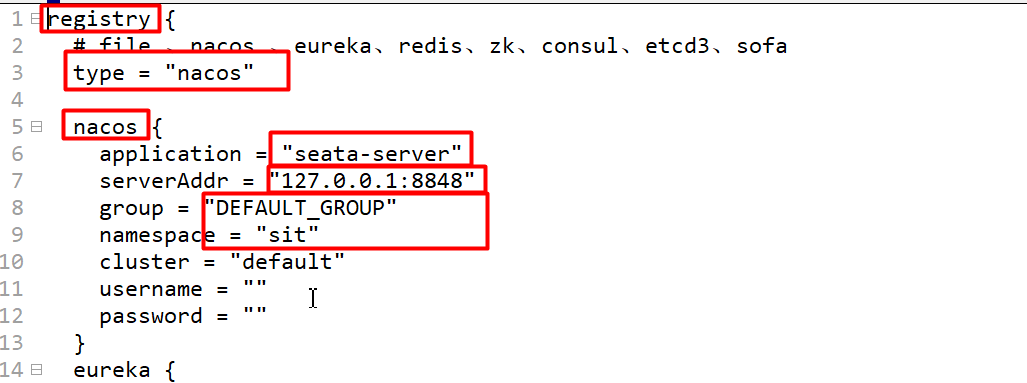
# 3.2.4:修改seata的注册中心
E:\seata-server-1.4.2\seata\seata-server-1.4.2\conf\registry.conf
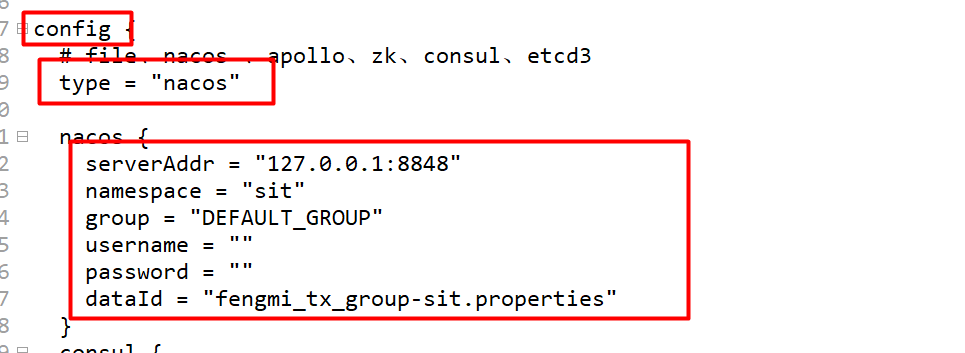
# 3.2.5:修改seata-server的配置中心
E:\seata-server-1.4.2\seata\seata-server-1.4.2\conf\registry.conf
# 3.2.6:Nacos配置中心管理seata配置
# 3.2.6.1:下载配置项
https://github.com/seata/seata/tree/develop/script/config-center
transport.type=TCP

transport.server=NIO

transport.heartbeat=true

transport.enableClientBatchSendRequest=false

transport.threadFactory.bossThreadPrefix=NettyBoss

transport.threadFactory.workerThreadPrefix=NettyServerNIOWorker

transport.threadFactory.serverExecutorThreadPrefix=NettyServerBizHandler

transport.threadFactory.shareBossWorker=false

transport.threadFactory.clientSelectorThreadPrefix=NettyClientSelector

transport.threadFactory.clientSelectorThreadSize=1

transport.threadFactory.clientWorkerThreadPrefix=NettyClientWorkerThread

transport.threadFactory.bossThreadSize=1

transport.threadFactory.workerThreadSize=default

transport.shutdown.wait=3

service.vgroupMapping.fengmi_tx_group=default

service.default.grouplist=127.0.0.1:8091

service.enableDegrade=false

service.disableGlobalTransaction=false

client.rm.asyncCommitBufferLimit=10000

client.rm.lock.retryInterval=10

client.rm.lock.retryTimes=30

client.rm.lock.retryPolicyBranchRollbackOnConflict=true

client.rm.reportRetryCount=5

client.rm.tableMetaCheckEnable=false

client.rm.tableMetaCheckerInterval=60000

client.rm.sqlParserType=druid

client.rm.reportSuccessEnable=false

client.rm.sagaBranchRegisterEnable=false

client.tm.commitRetryCount=5

client.tm.rollbackRetryCount=5

client.tm.defaultGlobalTransactionTimeout=60000

client.tm.degradeCheck=false

client.tm.degradeCheckAllowTimes=10

client.tm.degradeCheckPeriod=2000

store.mode=db

store.publicKey=

store.file.dir=file_store/data

store.file.maxBranchSessionSize=16384

store.file.maxGlobalSessionSize=512

store.file.fileWriteBufferCacheSize=16384

store.file.flushDiskMode=async

store.file.sessionReloadReadSize=100

store.db.datasource=druid

store.db.dbType=mysql

store.db.driverClassName=com.mysql.jdbc.Driver
store.db.url=jdbc:mysql://127.0.0.1:3306/seata?useUnicode=true
store.db.user=root
store.db.password=123456

store.db.minConn=5

store.db.maxConn=30

store.db.globalTable=global_table

store.db.branchTable=branch_table

store.db.queryLimit=100

store.db.lockTable=lock_table

store.db.maxWait=5000

store.redis.mode=single

store.redis.single.host=127.0.0.1

store.redis.single.port=6379

store.redis.maxConn=10

store.redis.minConn=1

store.redis.maxTotal=100

store.redis.database=0

store.redis.password=

store.redis.queryLimit=100

server.recovery.committingRetryPeriod=1000

server.recovery.asynCommittingRetryPeriod=1000

server.recovery.rollbackingRetryPeriod=1000

server.recovery.timeoutRetryPeriod=1000

server.maxCommitRetryTimeout=-1

server.maxRollbackRetryTimeout=-1

server.rollbackRetryTimeoutUnlockEnable=false

client.undo.dataValidation=true

client.undo.logSerialization=jackson

client.undo.onlyCareUpdateColumns=true

server.undo.logSaveDays=7

server.undo.logDeletePeriod=86400000

client.undo.logTable=undo_log

client.undo.compress.enable=true

client.undo.compress.type=zip

client.undo.compress.threshold=64k

log.exceptionRate=100

transport.serialization=seata

transport.compressor=none

metrics.enabled=false

metrics.registryType=compact

metrics.exporterList=prometheus

metrics.exporterPrometheusPort=9898
2
3
4
5
6
7
8
9
10
11
12
13
14
15
16
17
18
19
20
21
22
23
24
25
26
27
28
29
30
31
32
33
34
35
36
37
38
39
40
41
42
43
44
45
46
47
48
49
50
51
52
53
54
55
56
57
58
59
60
61
62
63
64
65
66
67
68
69
70
71
72
73
74
75
76
77
78
79
80
81
82
83
84
85
86
87
88
89
90
91
92
93
94
95
96
97
98
99
100
101
102
103
104
105
106
107
108
109
110
111
112
113
114
115
116
117
118
119
120
121
122
123
124
125
126
127
128
129
130
131
132
133
134
135
136
137
138
139
140
141
142
143
144
145
146
147
148
149
150
151
152
153
154
155
156
157
158
159
160
161
162
163
164
165
166
167
168
169
170
# 3.2.6.2:修改相关配置项
service.vgroupMapping.fengmi_tx_group=default     #忽略
store.mode=db
store.db.driverClassName=com.mysql.jdbc.Driver
store.db.url=jdbc:mysql://127.0.0.1:3306/seata?useUnicode=true
store.db.user=root
store.db.password=root    # 只需要改密码
2
3
4
5
6
# 3.2.6.3:创建配置文件
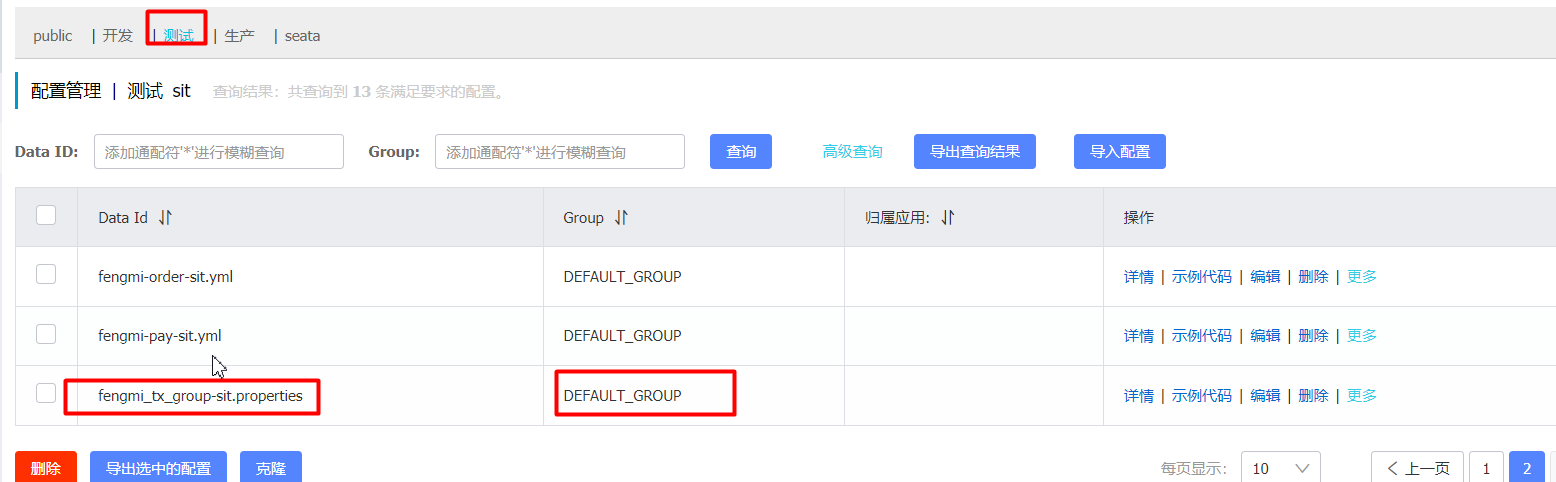
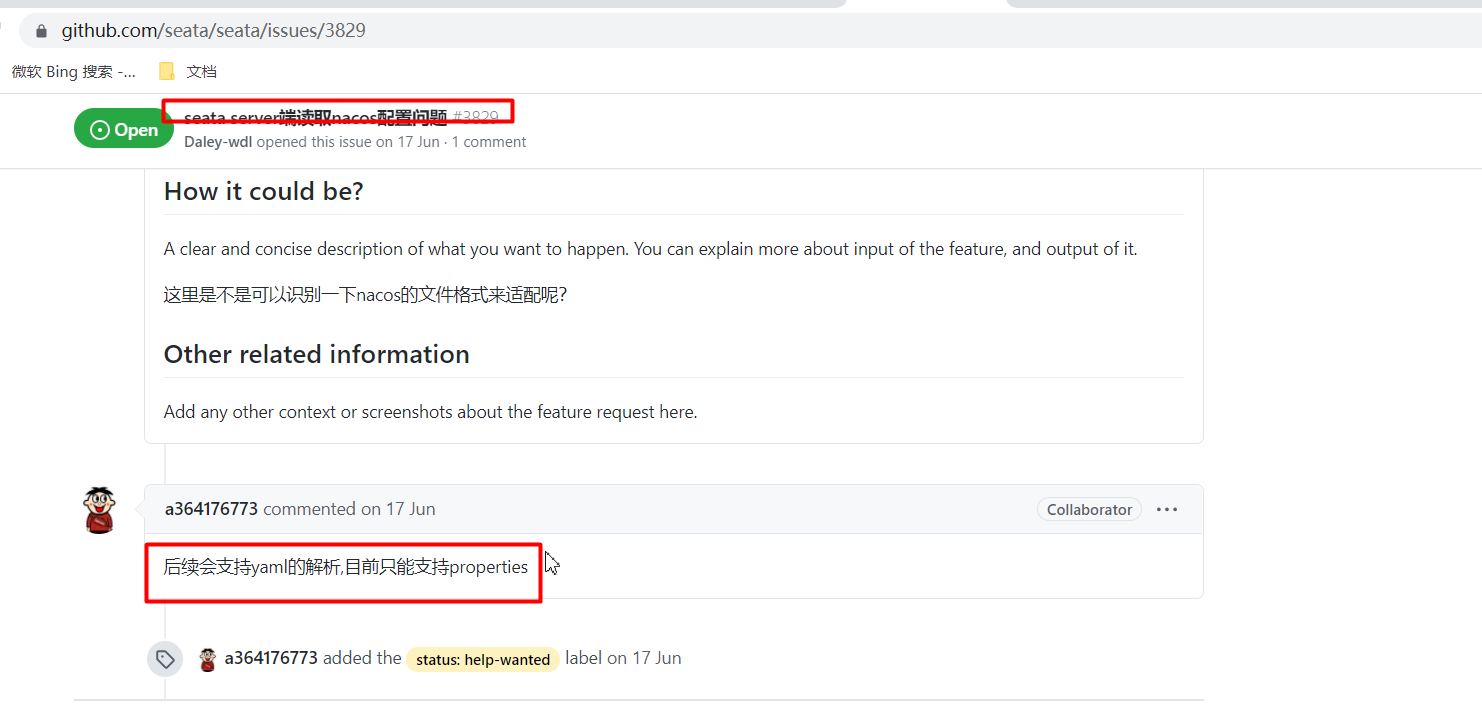
注意目前只支持properties,不支持yml
# 3.2.7:启动seata-server
注意 -h必须指定为局域网真实ip地址,不要指定127.0.0.1

seata-server.bat -h 10.30.162.78 -p 8898
# 3.3:Seata客户端
一个调用链中的所有微服务都是seata的客户端,都必须走下面的步骤
# 3.3.1:创建undo_log表
下载地址:https://github.com/seata/seata/tree/develop/script/client/at/db
-- for AT mode you must to init this sql for you business database. the seata server not need it.

CREATE TABLE IF NOT EXISTS `undo_log`

(

    `branch_id`     BIGINT(20)   NOT NULL COMMENT 'branch transaction id',

    `xid`           VARCHAR(100) NOT NULL COMMENT 'global transaction id',

    `context`       VARCHAR(128) NOT NULL COMMENT 'undo_log context,such as serialization',

    `rollback_info` LONGBLOB     NOT NULL COMMENT 'rollback info',

    `log_status`    INT(11)      NOT NULL COMMENT '0:normal status,1:defense status',

    `log_created`   DATETIME(6)  NOT NULL COMMENT 'create datetime',

    `log_modified`  DATETIME(6)  NOT NULL COMMENT 'modify datetime',

    UNIQUE KEY `ux_undo_log` (`xid`, `branch_id`)

) ENGINE = InnoDB

  AUTO_INCREMENT = 1

  DEFAULT CHARSET = utf8 COMMENT ='AT transaction mode undo table';
2
3
4
5
6
7
8
9
10
11
12
13
14
15
16
17
18
19
20
21
22
23
24
25
26
27
# 3.3.2:pom依赖
<!-- seata -->
<dependency>
    <groupId>com.alibaba.cloud</groupId>
    <artifactId>spring-cloud-alibaba-seata</artifactId>
    <version>2.2.0.RELEASE</version>
    <exclusions>
        <exclusion>
            <groupId>io.seata</groupId>
            <artifactId>seata-spring-boot-starter</artifactId>
        </exclusion>
    </exclusions>
</dependency>
<dependency>
    <groupId>io.seata</groupId>
    <artifactId>seata-spring-boot-starter</artifactId>
    <version>1.4.2</version>
</dependency>
2
3
4
5
6
7
8
9
10
11
12
13
14
15
16
17
# 3.3.3:配置
seata:
  enabled: true
  tx-service-group: fengmi_tx_group
  enable-auto-data-source-proxy: true
  config:
    type: nacos
    nacos:
      server-addr: 127.0.0.1:8848
      group: qfgroup
      namespace: dev
      username: nacos
      password: nacos
      data-id: cloud-seataserver.properties

  registry: #发现seata-server
    type: nacos
    nacos:
      application: seata-server
      server-addr: 127.0.0.1:8848
      namespace: dev
      group: qfgroup
      username: nacos
      password: nacos
2
3
4
5
6
7
8
9
10
11
12
13
14
15
16
17
18
19
20
21
22
23
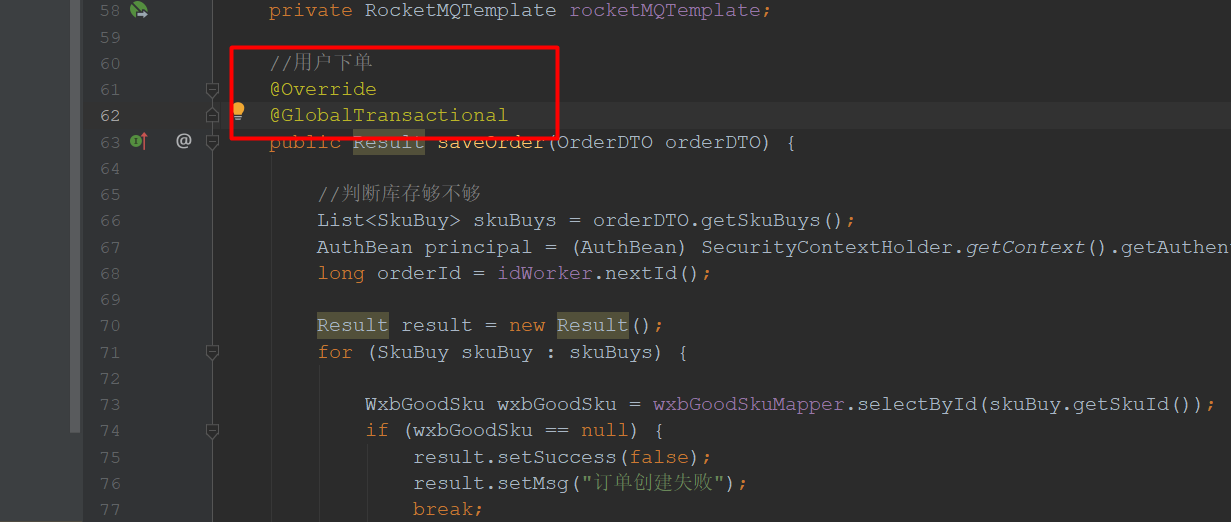
# 3.3.4:@Globaltransational
# 四:Seata全局事务并发怎么隔离
1 全局锁可以保证写隔离,拿不到全局锁,不能提交分支事务
2 读加锁(select for update) 可以保证读隔离,避免脏读
# 写隔离
- 一阶段本地事务提交前,需要确保先拿到 全局锁 。
- 拿不到 全局锁 ,不能提交本地事务。
# 读隔离
一个全局事务修改数据,另外一个全局读取数据怎么解决脏读
在数据库本地事务隔离级别 读已提交(Read Committed) 或以上的基础上,Seata(AT 模式)的默认全局隔离级别是 读未提交(Read Uncommitted) 。
如果应用在特定场景下,必需要求全局的 读已提交 ,目前 Seata 的方式是通过 SELECT FOR UPDATE 语句的代理。
2
面试:
1:什么是分布式事务
分布式系统中,跨连接的事务
2:怎么解决分布式事务? seata
3:seata分布式事务的工作流程/原理/机制
TM:事务管理器 ,标注了@GlobalTransational的方法就受TM的管理,开启全局事务,发起全局事务的提交, 或回滚
TC: Seata 服务器,事务协调器 ,接收TM的指令,向RM传达指令,生成全局事务ID RM:Seata 客户端,资源管理器 一阶段提交:解析和执行sql语句,需要获取全局锁,获取前后镜像存放到undo_log表 二阶段提交:删除undo_log表记录 ,释放全局锁
二阶段回滚:执行sql语句数据恢复,删除undo_log表记录 ,释放全局锁
4:seata全局事务并发隔离如何实现?
(1) 全局锁可以保证写隔离,拿不到全局锁,不能提交分支事务
(2)读加锁(select for update) 可以保证读隔离,避免脏读
← Sleuth